By SocialStatsIQ Editorial Team
Reaction Videos & Fair Use: How to Avoid YouTube Reused Content Bans with Added Value Commentary
Run a reaction channel without getting banned. Learn how to satisfy YouTube's reused content policy, picture-in-picture rules, and safe audio editing.
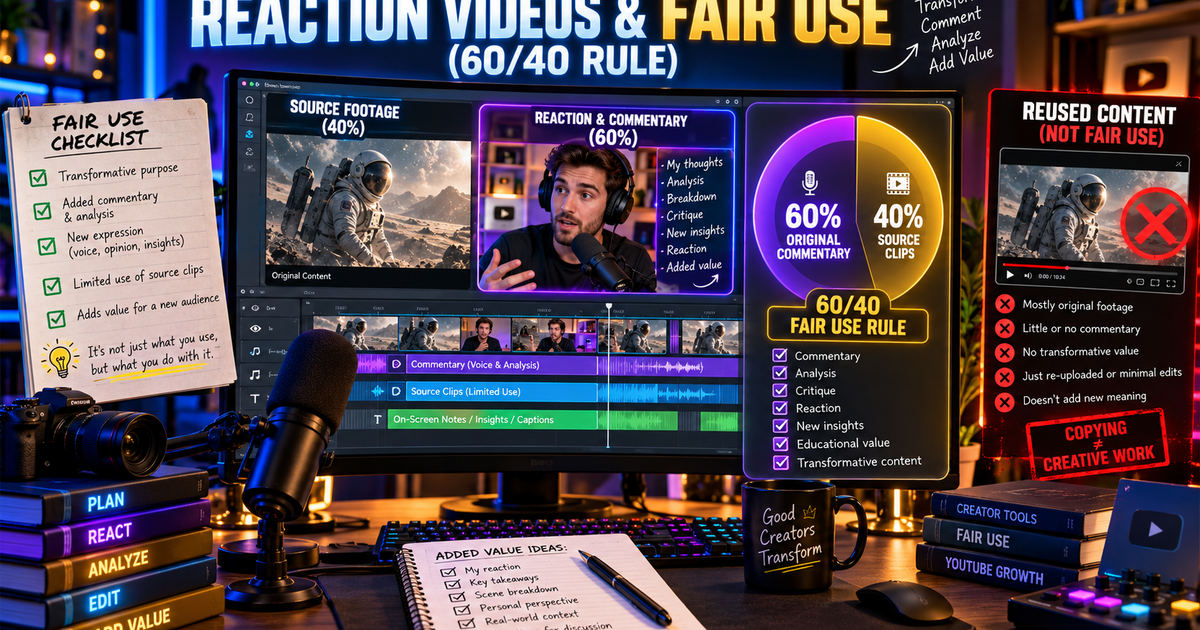
Reaction videos are among the most popular and rapidly growing formats on YouTube. From music producers analyzing vocal stems to film enthusiasts reacting to movie trailers, reaction content bridges communities and generates massive view counts.
However, reaction creators face the most perilous monetization trap on the entire platform: The Dual-Threat Policy Squeeze.
- On the Legal Front: Movie studios and record labels trigger Content ID claims and Copyright Strikes for unauthorized redistribution.
- On the Platform Monetization Front: Even if copyright holders permit your video to remain live, YouTube's internal Partner Program examiners frequently suspend or reject reaction channels under the Reused Content policy.
The critical insight most creators miss is that having copyright permission does NOT protect you from a Reused Content ban. YouTube's human reviewers are instructed to demonetize channels that simply act as conduits for third-party media without adding significant original value.
This guide provides the exact editing formulas, commentary time ratios, and visual composition rules required to protect your reaction channel from both copyright strikes and YPP demonetization.
1. Copyright Infringement vs. Reused Content: The Reaction Trap
Many creators confuse these two policies, leading to sudden channel demonetization:
| Channel Metric | Copyright Strike / Claim | Reused Content Policy Demotion |
|---|---|---|
| Who Enforces It | External rights holder (label, studio) | YouTube Internal Human Review Team |
| What Triggers It | Matching audio or visual fingerprints | Lack of substantial original commentary |
| Does Permission Help? | Yes (licenses clear copyright claims) | NO (Having permission does not prevent reused content flags) |
| Channel Standing | 1 of 3 legal strikes | Account status remains "Good", but Monetization is suspended |
| Resolution Pathway | Legal dispute / counter-notification | 30 or 90-day reapplication with restructured content |
2. What YouTube Reviewers Classify as "Lazy Reactions"
YouTube's official Partner Program guidelines explicitly state that channels are ineligible for monetization if they upload:
- *"Videos that simply compile clips with little or no commentary or narrative."*
- *"Content where the creator's presence is minimal, repetitive, or non-educational."*
The 4 Warning Signs of a "Lazy Reaction" (Guaranteed Demonetization):
- Passive Head-Nodding: Sitting silently on camera for 3 minutes while a trailer or music video plays in full.
- Minimal Superficial Reactions: Uttering generic exclamations (*"Wow"*, *"That's crazy"*, *"Bro what?!"*) without analyzing why the scene worked.
- Continuous Unbroken Playback: Allowing the source video to play for longer than 30 consecutive seconds without pausing to critique or discuss.
- Massive Video-to-Face Ratio: Displaying the copyrighted third-party video on 90% of the screen while the creator's webcam is squeezed into a tiny corner square.
3. The 60/40 Commentary Rule: The Gold Standard Formula
To satisfy YouTube's strict human reviewers and build an ironclad fair use defense, adopt the 60/40 Value Allocation Rule:
- At least 60% of the total runtime must feature your voice, analysis, critique, historical context, or camera presence.
- No more than 40% of the runtime should be third-party source footage.
- Every clip played must be immediately justified by a preceding or subsequent breakdown.
4. Visual Layout Standards: The 3 Algorithm-Safe Compositions
How you visually arrange your reaction frame in Adobe Premiere, DaVinci Resolve, or Final Cut dramatically impacts automated Content ID detection and human reviewer assessment:
Layout A: The 50/50 Split-Screen (Recommended for Two Hosts)
- Split the 16:9 canvas vertically down the center.
- Dedicate the left 50% to your studio camera feed.
- Dedicate the right 50% to the video being reviewed.
- This visually proves to human reviewers that your presence is equal in prominence to the media being critiqued.
Layout B: The Dominant-Creator PIP (Best for Single Creators)
- Keep your studio camera feed scaled to 100% full screen.
- Place the reference media inside a Picture-in-Picture window occupying no more than 30% to 35% of the frame (usually in a lower corner).
- Add a subtle border or drop shadow around the reference window.
Layout C: The "Cut-To-Full-Screen" Editorial Pacing
- When the reference video is playing, use Layout A or B.
- The moment you pause to make a point, cut the reference media completely off the screen and bring your camera to full 100% view.
- This dynamic editorial pacing signals to YouTube's vision models that the creator's discussion is the primary show.
5. Audio Engineering for Reaction Videos
Automated Content ID systems primarily match audio waveforms. To prevent automated automated revenue claims on fair use commentary:
- Audio Ducking: Set up automatic audio ducking in your editor so that whenever you speak, the volume of the reference video automatically drops by -12dB to -18dB.
- Frequency Notching: Slightly notch down mid-range frequencies (1kHz to 3kHz) on the reference track to ensure your spoken commentary sits cleanly in the front of the mix.
- Never Play Isolated Music Stems: If reacting to songs, talk periodically over the track or break down specific sections in 10-second segments. Continuous playback of an entire commercial song will trigger an automated Content ID revenue redirect 99% of the time.
6. How to Win a Reused Content Appeal as a Reaction Channel
If your reaction channel was demonetized for Reused Content, follow this workflow for your 5-minute video appeal:
- Highlight Your Expertise: Explain why your perspective matters (e.g., *"I have been a working audio engineer for 12 years, and I break down vocal production techniques for my viewers."*)
- Show the Timeline: Open your project timeline in your editing software. Show how many cuts you made—demonstrate that you paused the original video 25 times over an 8-minute duration.
- Play the Isolated Audio Track: Show that your original microphone track is active throughout the entire video.
- Demonstrate Educational Value: Point to specific moments where you highlighted vocal harmonies, camera angles, or narrative devices that a viewer could never experience by watching the original alone.
7. Frequently Asked Questions (PAA)
Can you monetize a reaction channel on YouTube?
Yes. Hundreds of reaction channels are fully monetized in the YouTube Partner Program. However, you must provide substantial original value—including insightful commentary, educational critique, and frequent pausing—so that your videos are not classified as "Reused Content" by YouTube human reviewers.
How do I make reaction videos without getting copyrighted?
To minimize copyright claims, keep reference clips brief (pause every 15 to 20 seconds), scale the reference video to occupy less than 50% of the screen, talk over key segments to modify the audio waveform, and avoid playing complete, uninterrupted songs or movie scenes.
What makes a reaction video fair use?
Under United States copyright law (17 U.S.C. § 107), a reaction video qualifies as fair use if it is transformative—meaning it adds new commentary, educational critique, or historical context rather than acting as a free entertainment substitute for the original work.
Why do reaction channels get banned for reused content?
Reaction channels are demonetized for Reused Content when creators upload long, unedited stretches of third-party videos with only minimal, repetitive, or superficial commentary (such as head-nodding or simple exclamations). YouTube requires significant original editorial involvement to qualify for advertiser revenue.